

📝 This article contains affiliate links.
Key takeaways
I published a ComfyUI template (ACE-Step 1.5 XL) to the Runpod Hub. The process itself is short: put .runpod/hub.json and .runpod/tests.json at the root of a GitHub repo of its own, cut a release, and Runpod builds the image from your Dockerfile and runs your tests. It still took me eight releases to get listed.
Three things actually blocked me, and none of them are spelled out in the docs:
- You need a
handler.py, even if your app is already an HTTP server. - An empty
"input": {}intests.jsonnever reaches your handler. Use something like{"health_check": true}and make the handler answer it. - A green build doesn't prove the required packages were installed. Add one test that runs a real workflow.
This post covers the steps, the hub.json / tests.json settings that bit me, and the exact error messages, so you can find this page by searching for them. Everything here is based on releases I made in August and September 2026. The Hub is still evolving, so check the official docs for anything marked as a spec.
- TestedAug–Sep 2026
- TemplateComfyUI + ACE-Step 1.5 XL
- Releasev0.4.7
Who this is for
You have a Docker image that works on Runpod (as a Pod or a Serverless worker) and you want it listed on the Hub. If you just want to run plain ComfyUI, the official ComfyUI templates are enough. A custom template only makes sense when it does something the official ones don't. In my case, that was downloading the right ACE-Step 1.5 XL diffusion model, text encoders, and VAE into the right folders.
The repo I use as the example throughout is RyoheiTanaka/runpod-template-acestep15xl.
How to publish a template to the Runpod Hub
.runpod/ is only recognized at the repo root, so each GitHub repo maps to exactly one Hub listing. If you keep several templates in a monorepo, you'll need to split them. I split one template off from my existing monorepo.
The Hub builds the image from your repo. It doesn't reference an image you already pushed to GHCR or Docker Hub.
Dockerfile, README.md, and handler.py can live at the repo root or in .runpod/. If both exist, .runpod/ wins, which is handy when the Hub needs a different Dockerfile from your other builds.
The built image is tagged as registry.runpod.net/<owner>-<repo>-main-dockerfile:<commit-sha>.
This defines the listing: title, description, icon, category, hardware requirements, and the environment variables users can set at deploy time. Details are in the next section.
These are the tests the Hub runs on every release. Each test sends a job to your handler. This file caused most of my failed releases.
Without it, start.sh gets committed with CRLF line endings and fails in the Linux container with a bash\r error.
*.sh text eol=lf
*.md text eol=lf
*.json text eol=lf
*.py text eol=lf
Dockerfile text eol=lfThe docs say it directly: "the Hub indexes releases, not commits". Pushing to main does nothing. Creating a release starts the build and the tests.
New releases are detected automatically. The docs say this usually happens within an hour, and before approval the console has a "Check for new release" button if you don't want to wait. After my listing went live, my September releases were picked up within 30 minutes. Being picked up doesn't mean the listing switches, though. The two releases I cut on November 3 and 4, 2026 (v0.4.5 and v0.4.6) never went live, and the console showed v0.4.6 as "Tests failed". The cause wasn't my code. It was GPU availability for the test run:
> There were no instances available for your specified GPU NVIDIA RTX A5000 nor on any of the fallback GPUs NVIDIA GeForce RTX 3090, NVIDIA L4. Please try again later.
There is no button to re-run a failed release, so "try again later" really means cutting a new release number. I released v0.4.7 from the same code, the tests passed, and the listing switched on November 12. If your listing is stuck on an old version, check the test result in the Releases tab before debugging your own repo.
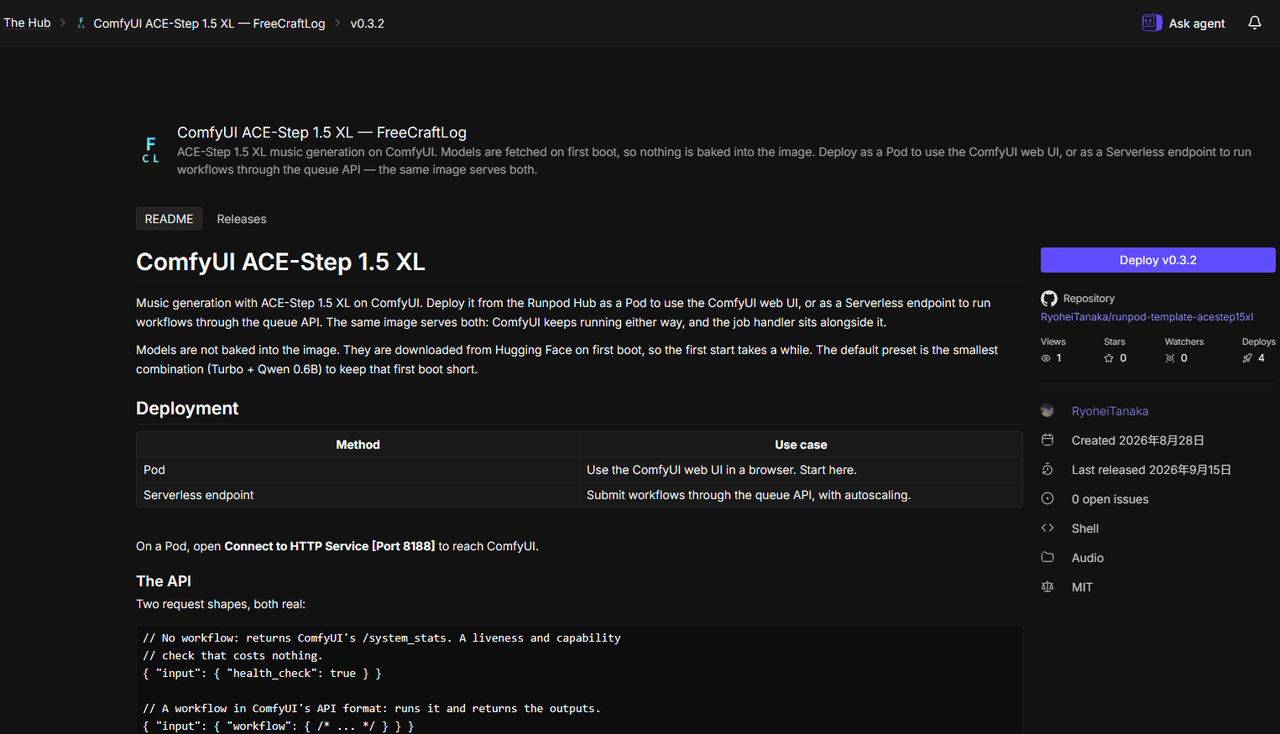
Once the build and tests pass, the Runpod team reviews the listing by hand. My tests passed on August 30, 2026 and the listing went live on September 15. I only noticed because I happened to open the console, so check back every few days.
Releases after approval are not reviewed again. When a new release passes its build and tests, the listing switches to it. The "Check for new release" button also disappears from the management page once you're live.
According to the docs, publishers can earn up to 7% of the compute revenue their listing generates, paid as Runpod credits. I'm not counting on that. Hub traffic for a small listing is low.
hub.json settings that matter
type: "serverless" is the only supported type
There's no Pod template type. A serverless listing still offers both "Endpoint" and "Pod" on the deploy page, so I registered as serverless. See the Pod caveat below before you promise users a web UI, though.
This is my hub.json config section as of v0.3.3:
{
  "title": "ComfyUI ACE-Step 1.5 XL — FreeCraftLog",
  "type": "serverless",
  "category": "audio",
  "config": {
    "runsOn": "GPU",
    "containerDiskInGb": 60,
    "gpuCount": 1,
    "gpuIds": "AMPERE_24,ADA_24,ADA_32_PRO,AMPERE_48,ADA_48_PRO,BLACKWELL_96,AMPERE_80,ADA_80_PRO,HOPPER_141"
  }
}
Don't write gpuIds from memory
gpuIds lists the GPU pools your listing can deploy to. I entered mine manually and left out ADA_32_PRO (RTX 5090, 32 GB). Of the cards that meet my 20 GB requirement, that was the cheapest one with high availability, at $0.69/hr on Community Cloud as of September 2026. I had also left out BLACKWELL_96.
GPU lineups change, so check the live catalog when you write this field. You can also allow a whole pool and exclude one model with a leading minus, such as "-NVIDIA GeForce RTX 4090".
allowedCudaVersions is exact match, not a minimum
I listed 12.8, 12.9, and 13.0, thinking of it as "12.8 or newer". It's an exact-match list. As of September 2026, CUDA 13.1 and 13.2 hosts existed, and some GPU types were only available on hosts running those versions (RTX 5000 Ada and RTX PRO 6000 Max-Q on 13.1 only). My CUDA 12.8 image would have run fine there. I excluded those hosts just by not listing the versions.
It has already happened again. I now list every version from 12.4 to 13.2, but when I checked the GPU catalog in November 2026, there were hosts on CUDA 13.3 and 13.4 (RTX 3090 on 13.3, RTX 5090 and RTX PRO 6000 Max-Q on 13.4), and my list left them out. I added 13.3, 13.4, and the BLACKWELL_32 GPU pool, and the listing picked them up on November 12 (after a detour through the failed test run described above). The Pod API has a minCudaVersion field, but as of November 2026 the Hub docs still describe allowedCudaVersions only as an array of version strings, with no minimum. So every new CUDA version means another release. If the image can't run on a host, the deployment fails there anyway, so a narrow list doesn't protect you.
env inputs become a form on the deploy page
Give an entry in config.env an input and it shows up as a field on the deploy page:
{
  "key": "ACESTEP_XL_VARIANT",
  "input": {
    "name": "Diffusion model",
    "type": "string",
    "options": [
      { "label": "Turbo (fastest to download)", "value": "xl_turbo" },
      { "label": "Base", "value": "xl_base" }
    ],
    "default": "xl_turbo"
  }
}
presets let you name combinations of those values, such as "Turbo (fastest first boot)" or "All models (slowest first boot)". Describe presets by what they do, not what they contain. I originally named one "minimal, recommended", and the name became inaccurate as soon as I changed the text encoder setup.
tests.json: what your tests need to look like
Here's the tests.json that finally passed:
{
  "tests": [
    {
      "name": "comfyui_serves_system_stats",
      "input": { "health_check": true },
      "timeout": 900000
    }
  ],
  "config": {
    "gpuTypeId": "NVIDIA RTX A5000",
    "gpuCount": 1
  }
}
The docs define input as a required "raw job input payload", and a test passes if the endpoint returns a 200. They don't say what happens when input is empty. That turned out to be important (see below).
A health check is not enough
health_check only proves that ComfyUI started and answers /system_stats. It never loads a model, so the test stays green even when the model files are the wrong combination.
That happened to me after the listing was live. A deploy-time variable let users pick one text encoder, but the official ACE-Step workflow loads two text encoders. A deployment with the default settings couldn't generate anything, and every test passed. I added a second test that submits the official turbo workflow and waits for an MP3. Builds take longer, but starting up and generating are different things, and the test has to cover both.
My first version of that test failed, too. I wrote the save node's inputs by reading the ComfyUI schema instead of running it, and nested format and quality wrong. I fixed it by POSTing the workflow to a running Pod and adding it to tests.json only after it returned an MP3.
Mistake 1: no handler (five failed releases)
ComfyUI is already an HTTP server, so I tried to skip the handler entirely. My basis was one row in the hub.json reference:
endpointType— When set to"LB", users can deploy your listing as a Serverless endpoint or a Pod directly from the Hub page.
I read that as "LB mode exposes your HTTP server directly". I even wrote a separate health server that returned 204 while models were downloading and 200 once ComfyUI was up. The load balancer uses those status codes to decide whether a worker is ready.
Releases v0.1.0 through v0.2.2 all failed.
The real problem was how I made the decision. At the time, endpointType appeared in exactly two places in the docs: that table row and a January 2026 changelog entry. I bet five releases on a beta feature without finding a single working example of it. When I finally opened the ComfyUI listings already on the Hub, both of them used a handler:
| Listing | Deploys (Aug 2026) | Handler | endpointType |
|---|---|---|---|
runpod-workers/worker-comfyui |
13,815 | yes | not set |
vavo/LTX2.5-serverless |
— | yes | not set |
Their tests.json inputs were real jobs for that handler: a full ComfyUI workflow for worker-comfyui, and {"health_check": true} for LTX2.5. Hub tests send a job to the handler. Without one, no amount of port or health-check fixing will pass. I was debugging code the tests never executed.
v0.1.0 was also accepted without a handler. Being accepted at submission only means the file check passed. It says nothing about passing the tests.
This is the handler I ended up with. If the job has a workflow, it queues it in ComfyUI. Otherwise it returns /system_stats:
def handler(job):
    job_input = job.get("input") or {}

    ready, error = wait_for_comfy()
    if not ready:
        return {"error": error}

    workflow = job_input.get("workflow")
    if not workflow:
        return {
            "status": "ready",
            "comfyui": _get_json("/system_stats"),
        }

    return run_workflow(workflow)
ComfyUI keeps running next to the handler, so the same image works as a Pod and as a Serverless worker.
Mistake 2: the build was green, but the package wasn't there
In v0.3.0 I added the runpod package to the Dockerfile, or thought I did. The text replacement I used silently failed to match anything, so the Dockerfile didn't change, and the build was green. I wrote "build succeeds with the runpod package" in the commit message and the release notes without checking.
The Hub logs showed no workers at all:
workersEffective=0  workersHealthy=0  workersUnhealthy=0  workersRunning=0  workersMax=1
timeInQueue  522228 → 882512
On Serverless, the handler is the worker. The SDK registers the worker with the job queue. import runpod was failing, so as far as Runpod could tell, no worker existed.
My start.sh made it worse by ignoring the handler crash:
[start] starting the serverless handler
ModuleNotFoundError: No module named 'runpod'
[start] handler exited, continuing to serve ComfyUI
The container stayed up serving ComfyUI, and the real cause stayed hidden for three releases. During that time I changed container disk size, the CUDA list, and GPU types. None of it mattered.
I added two fixes. First, the install step now verifies the import in the same layer, so the build fails if the install didn't happen:
RUN python -m pip install --no-cache-dir --target /opt/runpod/pylibs runpod \
    && PYTHONPATH=/opt/runpod/pylibs python -c 'import runpod; print("runpod:", runpod.__version__)'
Second, on Serverless only, a dead handler now causes the container to exit:
elif [ -n "${RUNPOD_ENDPOINT_ID:-}" ]; then
  echo "[start] error: handler failed on a Serverless worker"
  exit 1
On a Pod it keeps going, because a Pod has no job queue and the handler exiting is expected there.
Installing runpod into ComfyUI's Python environment failed on my CUDA 13.0 base (Ubuntu 24.04 system Python) with error: uninstall-no-record-file. runpod pulls in fastapi[all], and pip tries to replace apt-installed packages that have no RECORD file. --target never uninstalls anything, so it avoids that path.
Mistake 3: "Job has missing field(s): id or input"
With the handler installed and workers starting, the test still hung at IN_PROGRESS. The worker log said:
Failed to get job. | Error Message: Job has missing field(s): id or input.The runpod SDK only checks that the keys exist:
if "id" not in jobs or "input" not in jobs:
    raise Exception("Job has missing field(s): id or input.")
My tests.json had "input": {}. Since the SDK rejected it, Runpod appears to drop an empty input from the job entirely. That's my inference from the SDK code; the docs don't say it. Changing it to {"health_check": true} fixed it.
I had seen {"health_check": true} in the LTX2.5 listing earlier and dismissed it as a hack to get past the test. It's actually the only option: since input can't be empty, you need a minimal job with something in it. I made the handler answer that job with /system_stats, which is also a useful response for the endpoint itself.
Other errors and gotchas
Reading the Hub logs: workersUnhealthy=0 vs 1
This line appears in the Hub logs:
scaleup to catch up - immediate scaling for empty endpoint
  workersRunning=0 workersHealthy=0 workersUnhealthy=0 workersMax=1 timeInQueue=882512
I read "empty endpoint" and skipped the rest. In my case, the counters told me where to look. This is my reading of them, not documented behavior:
workersUnhealthy |
Meaning | Look at |
|---|---|---|
| 0 | No worker was ever scheduled or registered | Config, GPU requirements, image pull, the handler/SDK |
| 1 or more | A worker started and then failed | Container contents and logs |
I assumed my container was starting and failing, and spent my time fixing the container.
"Failed to get Hub registry auth": you can't pull Hub images
Hub-built images live on registry.runpod.net, and only Hub deployments can authenticate to it. A Pod started with the same image name fails like this:
Failed to get Hub registry auth. Is this a template you have access to?
error creating container: No such image: registry.runpod.net/...
It retries every 16 seconds, and you're billed while it does. So there's no direct way to inspect a Hub image. I set up a separate workflow that pushes the same image to GHCR, started a normal Pod from that, and only then could I read logs from inside the container. If you publish to the Hub, keep a separate way to distribute the image.
The Hub build times out after 30 minutes
This came after the listing went live. v0.4.0 changed nothing in the Dockerfile and still failed: the Hub's docker build step times out after 30 minutes (separate from the overall time limit), and the build log showed pip downloading at 68–80 kB/s. The same Dockerfile built in about 4.5 minutes on GitHub Actions. There's no "retry build" button, so the only fix was to cut the same code as a new release (v0.4.1), which passed.
Because one slow mirror can use up a version number, I moved the large layers (apt packages, a pinned torch/torchvision pair, ComfyUI, requirements, and the runpod SDK) into a public base image on GHCR. Each template's Dockerfile is now just FROM plus COPY. Prebuilding is also what the Runpod docs suggest for long builds.
It didn't make builds much faster. On the Hub, v0.4.4 built in 2 min 47 s versus about 4 min for v0.4.1. On GitHub Actions the difference was about 30 seconds, because pushing a 4.86 GB image takes most of the time there. The real benefit is that Hub builds no longer depend on the builder's download speed from PyPI.
Pin the base image to an immutable tag. If you push a new image under the same tag, every template that uses it silently picks up the new contents on its next build.
"Deploy as Pod" doesn't give you the web UI
My README said "Deploy as a Pod to use the ComfyUI web UI". That was wrong, and I found out after the listing went live.
A Hub listing has no field for declaring ports. A Pod started from the listing exposes only 80/http and 443/tcp, so ComfyUI's port 8188 can't be reached. I confirmed this on September 18, 2026. The startup log shows what a Hub "Pod" actually is: a Serverless worker running as a Pod.
[INFO] Serverless runtime is ready
[INFO] Local API is ready  {"url": "http://127.0.0.1:80/v2/LOCAL"}
I now use the Hub listing for Serverless and for testing, and point people who want the ComfyUI UI to a regular Runpod template that uses the same GHCR image.
Performance notes
Measure where it runs, not on your machine
Early on, two Hub tests failed and I blamed slow model downloads, based on a 419-second download I had measured at home. My planned fixes were a longer RUNPOD_INIT_TIMEOUT and baking the models into the image.
The first cold start on an RTX 4090 Pod (August 2026, the old 10.10 GB devel-based image) looked like this:
Image pull        5 min 45 s   (78%)
Model download    1 min 27 s   (20%)
ComfyUI start          11 s    ( 2%)
Total             7 min 23 s
On Runpod the download took 87 seconds, about five times faster than on my home connection. The image pull was the bottleneck. Baking the models in would have made the 5:45 pull bigger to save 87 seconds of download, so it would have made startup slower. When the network is the bottleneck, measure on the machine where the job runs.
Side effect: the image shrank from 10.10 GB to 4.81 GB
While chasing the failures, I switched the base image:
runpod/pytorch:2.8.0-py3.11-cuda12.8.1-cudnn-devel-ubuntu22.04
  ↓
pytorch/pytorch:2.8.0-cuda12.8-cudnn9-runtime
devel includes nvcc, headers, and static libraries. ComfyUI doesn't use any of them at runtime, and only 1.7 GB of the image came from my repo. The compressed image size in GHCR went from 10.10 GB to 4.81 GB, 52% smaller.
Startup time didn't shrink by the same ratio. In one run, the pull dropped from 5:45 to 4:01 (30%). The runtime image has fewer layers (11 vs 34), and downloads run in parallel but extracting one huge layer doesn't. Pull time also varied by data center: 4:01 and 4:27 for the same image on the same day.
Container disk usage showed that the image doesn't count against container disk. Only the writable layer does:
Disk space check passed: 39.27GB free (78.5% available) ← containerDiskInGb=50Usage was 10.73 GB, and the turbo model files are 10.71 GB.
Where it stands now
v0.3.2 passed the build and tests, and the listing went live on September 15, 2026 after manual review. The current release is v0.4.7 (as of November 12, 2026). Serverless works:
--- Starting Serverless Worker | Version 1.12.0 ---
All fitness checks passed. (2002.52ms)
delayTime 29.23s / executionTime 2.08s / Completed
Listing: console.runpod.io/hub/RyoheiTanaka/runpod-template-acestep15xl
Only three of my eight releases fixed an actual cause. In the others I was fixing things that weren't broken. Looking back, almost all of these issues would have been obvious if I had checked first. The biggest lesson wasn't technical: look at how something that already works was built before you start. Opening two existing Hub listings would have saved me five failed releases.
FAQ
Yes. Hub tests send a job to your handler and wait for a 200 response, so without a handler the tests can't pass. I tried endpointType: "LB" to expose an HTTP server directly, and five releases failed. The docs say the repo needs handler.py, Dockerfile, and README.md at the root or in .runpod/. They don't say LB mode removes the handler requirement.
A GitHub release. Commits to main don't trigger anything. Detection usually takes under an hour, and before approval there's a manual "Check for new release" button in the console. After approval there's no way to trigger it yourself, and in November 2026 I saw releases go unnoticed for more than a day. Runpod support told me (November 2026) that the issue preventing the Hub from detecting new GitHub releases has been fixed. When I cut v0.4.7, it was picked up automatically and went on to testing, so it works on my end too. I didn't time how long detection took.
No. .runpod/ must be at the repo root, so each repo has one listing. Split a monorepo into one repo per template.
No. With "input": {}, the job reaches the worker without an input field and the SDK rejects it with Job has missing field(s): id or input. Send a minimal job like {"health_check": true} and have your handler answer it.
No. It's stored on registry.runpod.net, and only Hub deployments can authenticate. A Pod using that image name fails with Failed to get Hub registry auth and keeps retrying. Push your own copy to a registry like GHCR if you need to debug inside the container.
Not as of September 2026. Hub listings can't declare ports, and the Pod only opens 80 and 443, so ComfyUI on 8188 isn't reachable. For the UI, use a regular Runpod template with the same image.
Try the template
If you want to run the same setup with the ComfyUI UI, the regular Runpod template is linked below. For Serverless, use the Deploy button on the Hub listing.
Runpod
If you sign up through this referral link with a Google account and add at least $10, Runpod gives you a one-time credit bonus. Customers in Europe get a fixed $5. Elsewhere it's a weighted random amount between $5 and $500, and Runpod says most people get $5 and about 96% get $10 or less. Only first-time Runpod users who sign up with Google qualify. Conditions as of November 2026; check the current terms on Runpod before you sign up.
A Japanese version of this article is available here.